You do not need an ArcGIS account to use the new viewer.
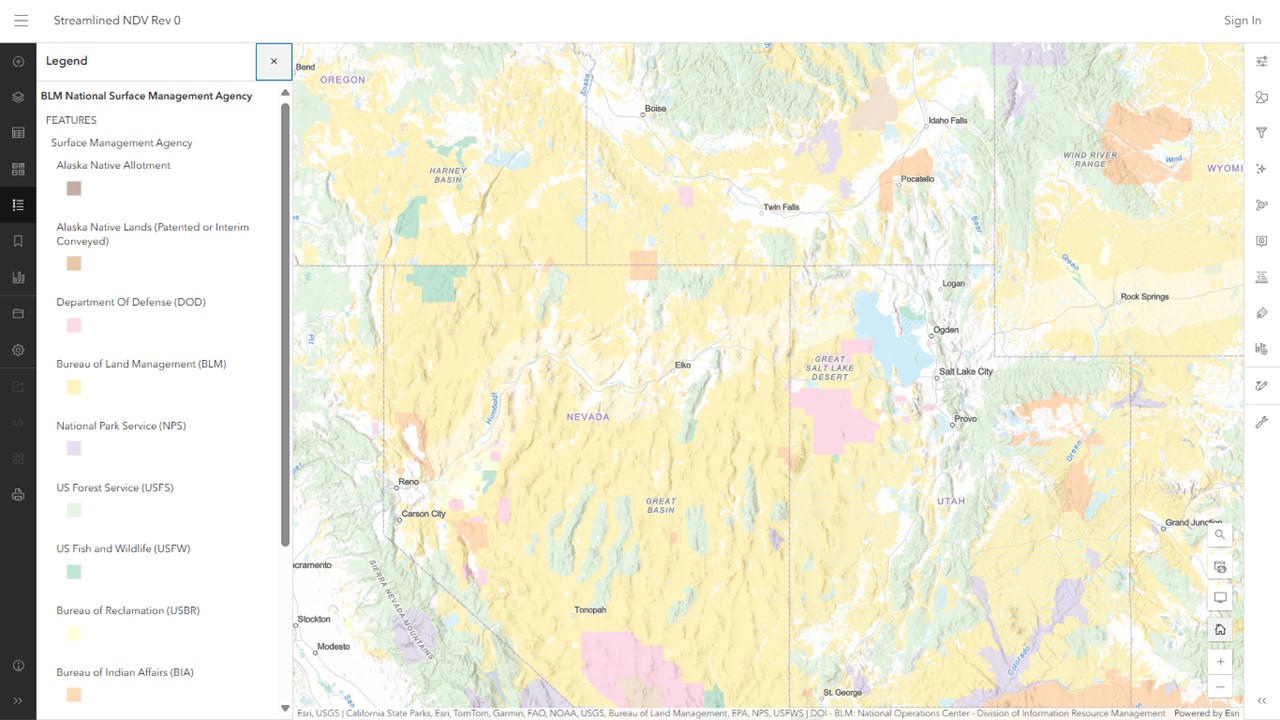
The default basemap is:
- Terrain with Labels
Four layers were included:
- BLM National Surface Management Agency (visible when you open it)
- BLM Natl Grazing Allotment Polygons (not visible)
- BLM Natl Wild Horse and Burro Herd Area Polygons (not visible)
- BLM Natl Wild Horse and Burro Herd Mgmt Area Polygons (not visible)
A legend appears initially, which you can toggle on and off with the Legend toolbar button on the left side of the map.
The Layers button toggles the layer list on and off.
To turn on the allotment layer, click the visibility icon next to the layer name (looks like an eye). Click it again to turn it off.
Same for the other layers.
The Zoom buttons are at the lower right.
Drag the map to see other areas.
The Search button, also on the lower right, moves the map to a town or other landmark you specify.
Click the Home button to restore it to the original view.
Click on an allotment or HMA to see basic information about the parcel.
RELATED: Creating an Account for the NDV Workaround.
 Western Horse Watchers Association